

The ZenScreen MB169CK is one of ASUS’s more understated portable monitors — no fancy touchscreen, no built-in battery, just a slim 15.6-inch Full HD display designed to be as easy as possible to carry around and plug into a laptop for extra screen real estate on the road.
Design and Build
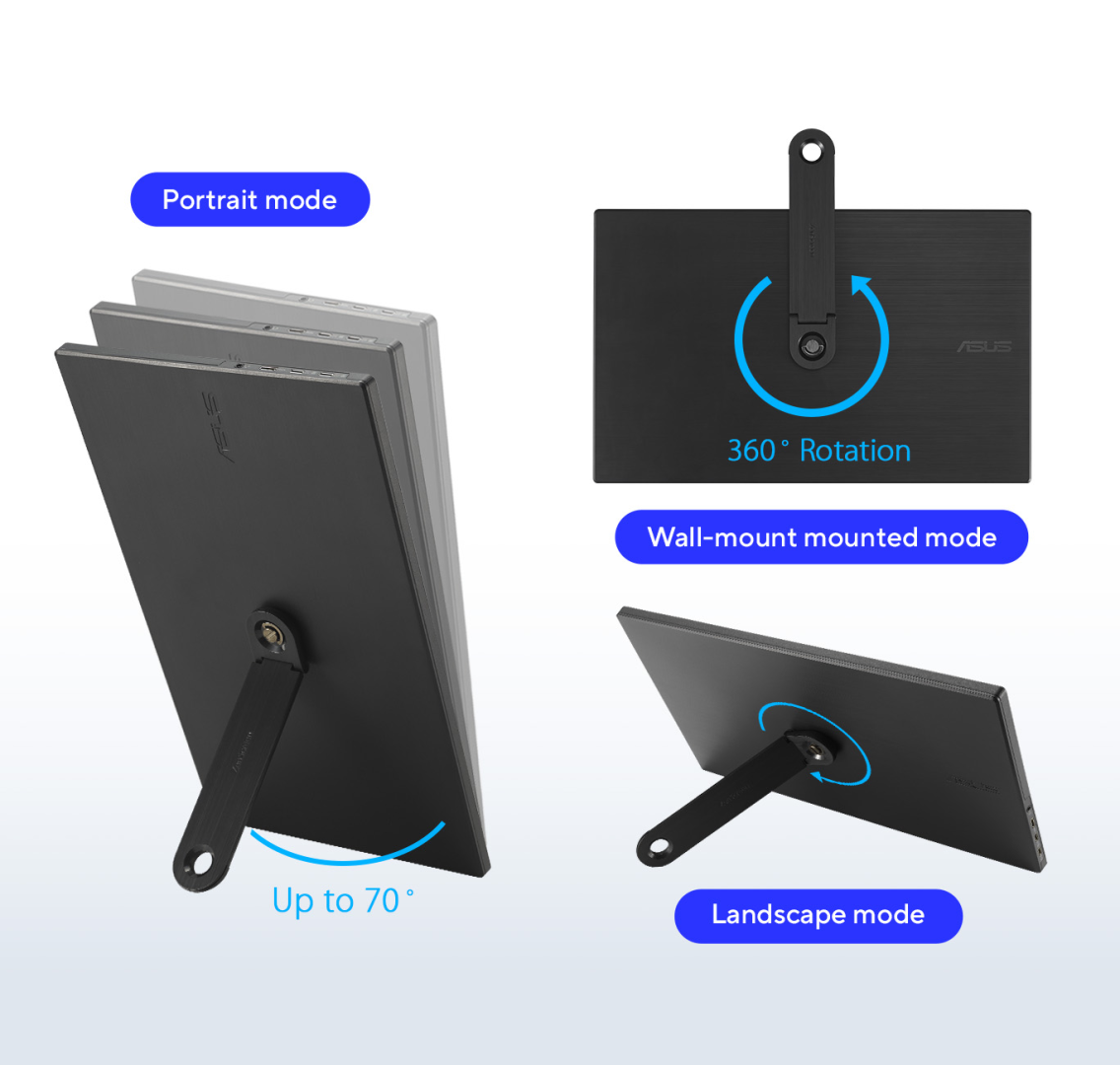
At 0.78kg and just 1.2cm thick, this is a genuinely travel-friendly monitor that should slip into most laptop bags without much thought. It ships with a fabric ZenScreen sleeve for basic protection in transit, along with a detachable 360° kickstand that screws into a quarter-inch tripod socket on the back, letting you prop it up in either landscape or portrait orientation, or mount it on an actual tripod if you want to position it somewhere unconventional. There’s no height adjustment mechanism, so positioning is limited to whatever angle the kickstand or a tripod gives you.
Display Quality
The panel itself features a 15.6-inch IPS display running at 1920×1080 with a 16:9 aspect ratio, anti-glare surface, and 178°/178° viewing angles. This is critical for a portable monitor; if you lift it, tilt it, or share your screen with a colleague sitting next to you, the colors and contrast won’t wash out or distort from off-center angles. With a typical peak brightness of 250 cd/m², the display is adequate for indoor use in well-lit offices or rooms.
Additionally, the display features a matte anti-glare surface. If you find yourself working in a brightly lit coffee shop or under harsh office fluorescent lights, the matte coating diffuses reflections so you aren’t staring at your own reflection.
Smart Software Features
Using the ASUS DisplayWidget Center software (compatible with both Windows and macOS), the monitor features automatic orientation sensing.
When you rotate the physical display, the software automatically triggers the OS to switch the screen between Landscape and Portrait modes.
Landscape Mode remains ideal for typical workloads, expansive spreadsheets, and media playback.
Portrait Mode shines for reviewing legal documents, reading long code repositories, scanning PDFs, or editing articles, allowing you to view full pages without constant scrolling.
Connectivity
Connectivity is deliberately kept simple: dual USB-C ports supporting DisplayPort Alt Mode, plus a single mini-HDMI port. If your laptop’s USB-C port supports DP Alt Mode, a single USB-C-to-USB-C cable handles both video and power, making setup as close to plug-and-play as portable monitors get.
If your laptop doesn’t support DP Alt Mode over USB-C, you can fall back to the mini-HDMI connection, The monitor is compatible with most modern MacBooks with no additional drivers needed on macOS. It can also connect to game consoles like Xbox, PlayStation, or a docked Nintendo Switch via the HDMI port.
Power draw is modest, rated at 7.64W typical, dropping below 0.5W in power-saving mode and under 0.3W when off.
Pros:
- Genuinely thin and light — easy to slip into a bag alongside a laptop
- Simple, mostly plug-and-play USB-C setup with broad MacBook compatibility
- TÜV-certified flicker-free and low blue light technology for comfortable extended use
- Versatile 360° kickstand with tripod-mount compatibility
- Low power draw, sensible for battery-conscious travel use
Cons:
- No built-in speakers
Conclusion
The ASUS ZenScreen MB169CK doesn’t pretend to be a high-end gaming screen or a professional color-grading monitor. Instead, it is designed to be a dependable, ultra-portable workstation upgrade. With its lightweight design, clever 360° kickstand, tripod flexibility, and seamless single-cable USB-C integration, it is an excellent productivity tool for anyone looking to take a dual-screen workflow anywhere.